> ## Documentation Index
> Fetch the complete documentation index at: https://cloud.laravel.com/docs/llms.txt
> Use this file to discover all available pages before exploring further.
# Upgrading from MySQL 8.0 to MySQL 8.4
> Learn how to prepare for and perform the upgrade from MySQL 8.0 to MySQL 8.4 on Laravel Cloud.
MySQL 8.0 is entering end-of-life in April 2026. We recommend upgrading all Laravel MySQL 8.0 databases to 8.4 as soon as possible. Although Laravel Cloud makes this incredibly easy, **the upgrade is irreversible**, so take a few minutes to prepare before starting.
## Before you upgrade
### 1. Back up your database
Before you do anything, create a manual backup of your database. If something goes wrong, this is your only way to recover.
1. Go to "Org > Resources > Databases"
2. Click on your Laravel MySQL 8.0 database
3. Go to "Backups"
4. Click "New backup"
5. Give your backup a name and a description
Learn more about [Laravel MySQL backups](/resources/databases/laravel-mysql#database-backups).
### 2. Review core changes between 8.0 and 8.4
Most applications will upgrade without issues, but check the following:
**Foreign key strictness.** Foreign key constraints now require a unique key on the parent table's referenced column, not just any index. If your schema has foreign keys referencing non-unique indexes, the upgrade will fail. Check your schema and ensure all referenced columns have a unique key or primary key.
**New reserved keywords.** MySQL 8.4 reserves several new words, including `MANUAL`, `PARALLEL`, `QUALIFY`, and `TABLESAMPLE`. If you use any of these as unquoted table or column names, queries will break. Either quote or rename those identifiers.
**`FLOAT`/`DOUBLE` with `AUTO_INCREMENT`.** This was deprecated in 8.0 and is fully removed in 8.4. If any of your tables have a column matching this combination, the upgrade will fail. Check with:
```sql theme={null}
SELECT table_schema, table_name, column_name, data_type
FROM information_schema.columns
WHERE extra LIKE '%auto_increment%'
AND data_type IN ('float', 'double');
```
If you get results, convert those columns to an integer type (e.g. `BIGINT`) before proceeding.
For the complete list of changes, see the [MySQL 8.4 upgrade documentation](https://dev.mysql.com/doc/refman/8.4/en/upgrading-from-previous-series.html).
## Performing the upgrade
### 3. Run the upgrade
Upgrading to MySQL 8.4 is irreversible.
Laravel Cloud makes upgrading your database easy.
1. Go to "Org > Resources > Databases"
2. Find your Laravel MySQL 8.0 database
3. Click "Upgrade" on the yellow banner below the database
4. Confirm your upgrade
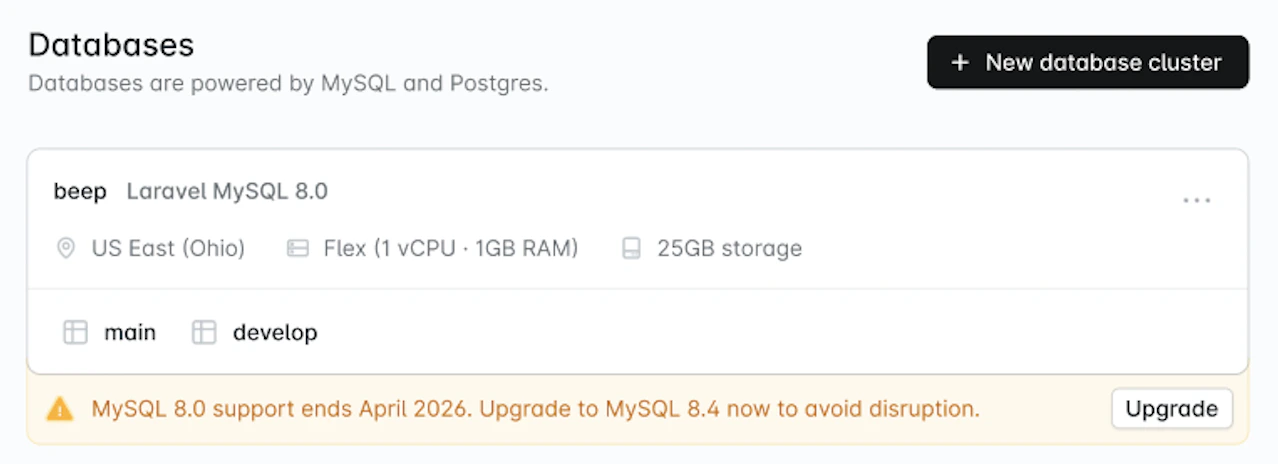 The process takes up to a few minutes. **Your database will be briefly unavailable during this time**. We recommend doing this during a low-traffic window.
### 4. Verify your application
Once the upgrade completes, confirm that your application is connecting and behaving normally.
## After the upgrade
### 5. Delete your backup (optional)
Once you're confident everything is working, you can delete the backup from step 1 to free up storage.
1. Go to "Org > Resources > Databases"
2. Click on your database (now on 8.4)
3. Go to "Backups"
4. Click "..." and delete the backup
The process takes up to a few minutes. **Your database will be briefly unavailable during this time**. We recommend doing this during a low-traffic window.
### 4. Verify your application
Once the upgrade completes, confirm that your application is connecting and behaving normally.
## After the upgrade
### 5. Delete your backup (optional)
Once you're confident everything is working, you can delete the backup from step 1 to free up storage.
1. Go to "Org > Resources > Databases"
2. Click on your database (now on 8.4)
3. Go to "Backups"
4. Click "..." and delete the backup